


Find my stuff: Home inventory
4.8169.00 Reviews
App Specs
- Version
- 1.24.1
- Updated On
- License
- Free
- Downloads
- 50,000+
- Developer
- Miquel Martinez
- Categories
- House & Home
- Platform
- Android
Screenshots

 Analysis by AppCompare
I find a home inventory app most useful when it answers a question at the moment I need it: which box holds the spare charger, when did I buy this appliance, or what exactly should I list before a move? Find my stuff: Home inventory is aimed at turning those details into a searchable record. Its appeal is easy to see in the first few days, but the real test is whether keeping that record current feels worthwhile after the initial organizing burst.
Why the first week feels useful
When I start an inventory, I resist the temptation to document every possession. That can turn a practical project into a second job. I would begin with one high-value or often-misplaced area: electronics, tools, or the storage cupboard where seasonal items disappear. A few useful entries give the search feature a chance to solve an actual problem before I decide whether to expand.
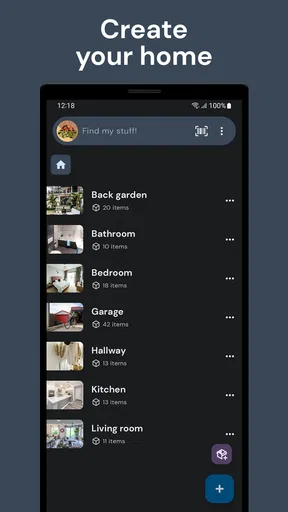
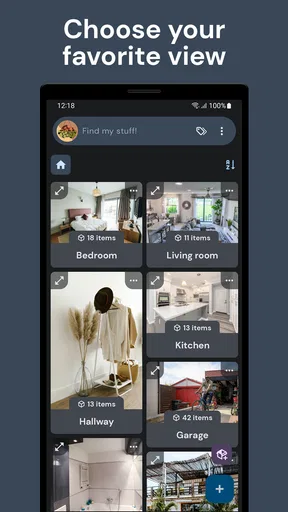
The room-based approach helps make that first pass concrete. Rather than facing an endless list, I can work through one space at a time and add names, photos, and details as I go. That is especially helpful for belongings that look similar, such as cables, small appliances, or boxed equipment. A photo gives future me a visual clue, while a specific item name makes a search more reliable than a vague label like “spare stuff.”
I would also treat the first session as a test of my own habits. If I naturally take a photo while putting something away, recording it may fit into my routine. If I keep postponing entries until I have time to write perfect descriptions, the inventory will probably stay incomplete. The best starting point is not a whole house; it is a small area I can finish and revisit.
Where recurring value comes from
After the novelty wears off, the app earns its place through retrieval, not through the size of the inventory. A record is valuable when it saves me from opening three boxes or asking someone else where an item went. Searching for “guitar,” as in the app’s example of quick lookup, illustrates the basic promise: turn memory into a query and get back to the item details I recorded.
That value can show up in ordinary routines. Before a weekend project, I can check whether I already own a suitable tool instead of buying another. When lending something to a friend, I can make a note of what left the house if I choose to include that detail. Before packing for a trip, I can check the list of items I keep for travel. These are not reasons to catalogue everything; they are reasons to capture the belongings that repeatedly cause small hassles.
Reminders can make the inventory useful beyond finding objects. If I add a warranty or maintenance prompt for an appliance, the record can help me connect a physical item with a future task. I would enter dates while I have the paperwork in front of me rather than try to reconstruct them later. That small bit of discipline matters: a reminder based on a guessed date is less dependable than no reminder at all.
Worth Reading Before You Choose

EA SPORTS FC Mobile 26 Is a Bigger Football Game, but It Takes Time

Flipboard Shows What News Apps Must Do Beyond the Feed

Switching to Android Auto Means Rethinking Your Driving Routine

Google Calendar Makes a Crowded Week Easier to Manage

Ludo King Makes the Most of the Minutes Between Plans

Baby Panda World Brings Quick Play to Modern Phones, but Its Game Library Feels Busy
A realistic moving-day use
Imagine I am preparing to move and have several boxes of kitchen gear, books, and cables. I can record what goes into each room-based part of the inventory as I pack, taking photos of items or groups that would be hard to identify later. At the new place, I can search instead of opening every box to find a particular object. The app can also give me a more organized record of possessions to consult while planning what needs careful handling.
There is a trade-off: an inventory only helps with boxes I actually document. If I pack in a rush and leave entries until after the move, the most useful details may never make it into the app. I would keep the process lightweight—record the box contents that are difficult to remember, not every everyday item, and use consistent names such as “kitchen: baking tools” rather than labels that will mean nothing in a few months.
Getting Started with Find my stuff: Home inventory
Setting up Find my stuff: Home inventory is pretty straightforward. Once you download the app, you’re greeted with a clean and intuitive interface that doesn’t overwhelm you with too many options right off the bat. It’s like the app knows I’m here to simplify my life, not complicate it further!
The Setup Process
First things first, I had to create an account. It’s as simple as it gets, and once you're in, you can start cataloging your items. The app lets you categorize them by rooms, which is super handy. I started with my living room, snapping photos of items and adding details like their names, purchase dates, and value. It’s almost like building a digital museum of your stuff!
User Interface and Experience
The design of the app is sleek and user-friendly. Navigation is a breeze, thanks to the well-thought-out layout. Everything is just a tap away, and there’s no lag or glitch that makes you want to pull your hair out. The search function is fast and effective too. Search "guitar" and boom, you’ve got all the deets you need.
Features That Stand Out
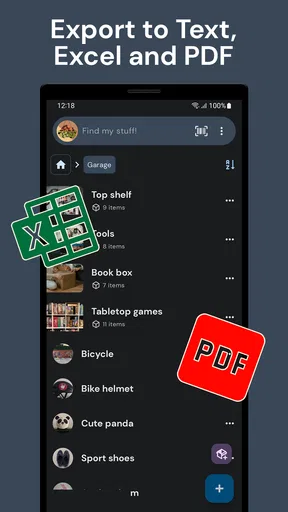
One feature I absolutely love is the ability to export your inventory. This is a lifesaver for insurance purposes. You can generate a report with all your items in a neat little PDF. Another cool aspect is the option to set reminders for warranties or maintenance. Got an appliance that needs annual servicing? The app’s got your back.
The app also supports multi-device syncing, so whether you’re on your phone, tablet, or computer, your inventory is always up-to-date. This is especially useful if, like me, you tend to misplace your phone and need to access your data from another device.
Security and Privacy
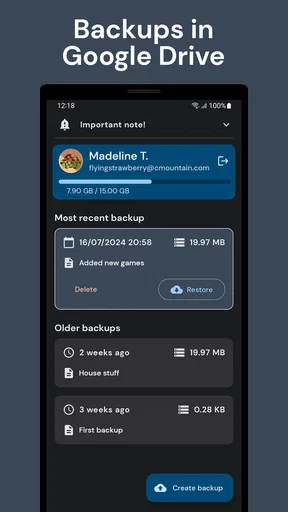
In today’s world, privacy is a big deal, and Find my stuff: Home inventory doesn’t skimp here. Your data is encrypted, and you have the option to backup your inventory to the cloud. I appreciate that they’re not snooping through my stuff because, let’s face it, nobody needs to know how many throw pillows I own!
Keeping the inventory alive
The maintenance burden is the part I would plan for from the beginning. A list becomes less trustworthy when items move between rooms, get donated, or are replaced. I would make one quick update whenever I put away a newly purchased appliance or clear a shelf, rather than scheduling a huge annual “inventory day.” A small, repeated habit is less demanding and keeps searches from leading me to outdated information.
For anything with a serial number, warranty paperwork, or a purchase value I may need later, I would add those details while they are easy to check. For low-cost household items, a name and room may be enough. This selective approach is one of the app’s most practical trade-offs: it can hold detailed records, but the user decides which belongings justify the time. Detailed entries make a report more useful; they also take longer to maintain.
What may become tiring
The main friction is manual effort. Photos, names, dates, and values can be helpful, but entering them for every object would be excessive for most households. If I do not enjoy cataloguing, I would focus on items that are expensive, hard to replace, frequently misplaced, or important during a move. People who want an automatically created list of everything in their home should look for a different kind of solution; this app depends on the information its user chooses to record.
There is also a difference between having a backup and having a complete record. Exporting a PDF gives me a portable snapshot, while keeping the inventory accurate still depends on updating it. I would export after a meaningful round of changes, especially before a move or when preparing records for insurance, and keep the file somewhere I can find it. I would not assume that an old report reflects what I own today.
Who will get the most from it
I see the strongest fit for people who move often, manage a rental, collect items, share household responsibilities, or simply have storage areas that are hard to remember. A collector can use room-based organization to make a broad collection easier to browse; someone managing a rental may find a written record useful when checking what belongs in a property. For a shared home, the practical benefit is less about making a perfect catalogue and more about giving everyone the same place to check before buying a duplicate.
By contrast, I would skip it if my possessions are already easy to locate, I rarely need records, or I know I will not maintain another list. A notes app or spreadsheet may suit someone who only needs a short checklist and wants complete control over its format. Those options can be quicker for a handful of objects, but they may take more effort to browse once the record grows. A photo gallery is even lighter, yet it does not provide the same structured item details and room organization described here.
Choosing a sensible level of detail
One useful workflow is to create entries in layers. I would first add the room and a clear item name, then return to fill in purchase dates or values only for belongings where those details matter. That keeps the inventory searchable early instead of delaying its usefulness until every field feels finished. For a collection, I would choose names that distinguish one piece from another, and for a moving box I would record its contents in a way that will still make sense after the room changes.
Another practical choice is deciding what not to record. Everyday consumables and replaceable odds and ends may not justify their upkeep. The better candidates are things I would be annoyed to replace, items with maintenance needs, and belongings whose location I routinely forget. This keeps the app from becoming a digital copy of every cupboard while preserving the parts that can save time or support a useful report.
Price, audience, and ongoing fit
As a free House & Home app from developer Miquel Martinez, it has a low barrier to trying a focused inventory; optional in-app purchases range from $3.49 to $14.99 per item. It is rated for Everyone, has a 4.7 average from around 785 ratings, and has passed 50,000 installs. It was released on April 28, 2023, and version 1.21.4 requires Android 8.0 or later. Those details make it easy to judge whether it fits your device and budget, but the lasting value still comes down to whether you use the record often enough to justify maintaining it.
If you are weighing a download, the key question is not whether you can list everything, but whether you have recurring moments when a reliable record would help. Try one room, a collection, or a set of appliances with warranties, then see whether searching and updating feel natural. The free starting point makes that a reasonable experiment, while paid items are worth considering only if their value is clear for your own use.
Final Thoughts
Overall, Find my stuff: Home inventory is a delightful app that does exactly what it promises. It’s like having a personal assistant who remembers everything for you. Whether you’re looking to declutter, prepare for a move, or just keep track of your things, this app is a solid choice.
If you’re someone who wants to be more organized and have peace of mind knowing where everything is, I’d say give it a shot. You might just find that it becomes one of those apps you can’t live without.
My long-term verdict
For me, this is a useful household tool when I treat it as a selective index rather than a complete census. Its rooms, search, photos, export, and reminders cover several reasons I would return to an inventory, but the regular upkeep is real. I would keep it if it repeatedly helps me find things, prepare for a move, or remember care and warranty tasks; I would not keep feeding it entries just to make the list look comprehensive.
That is why I think it can earn a lasting place on a phone for organized movers, renters, and collectors, while remaining unnecessary for someone with little to track. Start small, record details that will matter later, and check that the habit survives beyond the first burst of enthusiasm. If it does, the app turns a vague sense of “I know I own that somewhere” into a practical answer. If not, a simple note may be the more honest fit.
Pros
- Easy-to-use interface for tracking items.
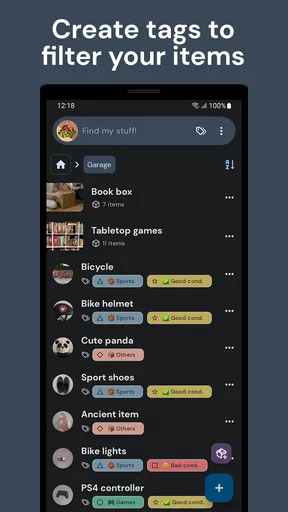
- Customizable categories for better organization.
- Supports photo attachments for each item.
- Cloud backup ensures data safety.
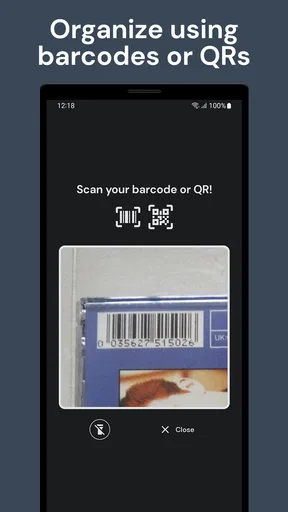
- Barcode scanner speeds up item entry.
Cons
- Limited to personal use
- no sharing option.
- Requires manual entry for non-barcoded items.
- Some features locked behind a paywall.
- Occasional sync issues with cloud backup.
- No offline mode for data access.
FAQs for Find my stuff: Home inventory
What is the main purpose of the Find My Stuff: Home Inventory app?
The Find My Stuff: Home Inventory app is designed to help users organize and keep track of their belongings. By creating a detailed inventory, users can easily log items by category, add photos, descriptions, and even purchase details. This is particularly useful for insurance purposes or simply to have an organized record of possessions.
How secure is the data stored within the Find My Stuff app?
Find My Stuff prioritizes user privacy and data security. The app incorporates secure cloud storage options, ensuring that your inventory is safely backed up. Additionally, users can set up password protection or biometric authentication to prevent unauthorized access, offering peace of mind regarding sensitive information.
Can I access my inventory from multiple devices?
Yes, the Find My Stuff app supports multi-device access. By syncing your data to the cloud, you can easily access your inventory from any device, whether it’s an Android or iOS platform. This feature ensures that you have up-to-date information available anytime and anywhere, providing flexibility and convenience.
Does Find My Stuff support barcode scanning for adding items?
Absolutely, the app includes a barcode scanning feature that allows users to quickly add items by scanning their barcodes. This feature streamlines the process of inputting information, as it can automatically fill in details like item name, brand, and model, saving valuable time and effort.
Is there a limit to the number of items I can add to my inventory?
The Find My Stuff app does not impose a strict limit on the number of items you can add. However, the limit might depend on the cloud storage plan you choose. Users can generally manage extensive inventories, making it suitable for both small households and large collections, ensuring comprehensive coverage of all possessions.


